Wednesday, April 2, 2014

My points of attention when upgrading from 7.1.1.7 to 7.5.0.5

Goal:
Points of attention when upgrading from Maximo 7.1.1.7 to Maximo 7.5.0.5.

Problem:
Not really a problem, but after an upgrade from 7.1.1.7 to 7.5.0.5 I encountered some (relatively easy to fix) issues. It would have been nice if these issues where solved when upgrading.

Solution:
Just a little list of found issues when upgrading from 7.1.1.7 to 7.5.0.5.


Issue:
Communication templates with default name are overwritten

Solution:
Copy-pasted the description from an backup Maximo to the new Maximo.


Issue:
Refferential Jobplan doclinks not showing on workorder. Note that I use 'Jobplan revisions' in 7.5.0.5.

Solution:
In 7.5.0.5 with Jobplan Revision, an extra relationship is created on workorder (pluscdoclink) the default relationship (doclink) is also modified with the revision statement in the jobplan section of the where. (Bold and red in the example below)

((ownertable='WORKORDER' and ownerid=:workorderid)
or (ownertable='WOACTIVITY' and ownerid=:workorderid and :istask=1))
or (ownertable='ASSET' and ownerid in (select assetuid from asset where assetnum=:assetnum and siteid=:siteid))
or (ownertable='LOCATIONS' and ownerid in (select locationsid from locations where location=:location and siteid=:siteid))
or (ownertable='JOBPLAN' and ownerid in (select jobplanid from jobplan where jpnum=:jpnum and (siteid is null or siteid=:siteid) and pluscrevnum =:pluscjprevnum) )
or (ownertable='PM' and ownerid in (select pmuid from pm where pmnum=:pmnum and siteid=:siteid))
or (ownertable='SAFETYPLAN' and ownerid in (select safetyplanuid from safetyplan,wosafetyplan where safetyplan.safetyplanid=wosafetyplan.safetyplanid and wosafetyplan.wonum=:wonum and wosafetyplan.siteid=:siteid))
or (ownertable in ('SR','INCIDENT','PROBLEM') and ownerid in (select ticketuid from ticket,relatedrecord where ticketid=recordkey and ticket.class = relatedrecord.class and relatedrecclass=:woclass and relatedreckey=:wonum and relatedrecsiteid=:siteid))
or (ownertable in ('WOCHANGE','WORELEASE','WOACTIVITY') and ownerid in (select workorderid from workorder,relatedrecord where wonum=recordkey and workorder.woclass = relatedrecord.class and relatedrecclass=:woclass and relatedreckey=:wonum and relatedrecsiteid=:siteid))
or (ownertable='COMMLOG' and ownerid in (select commloguid from commlog where ownerid=:workorderid and ownertable in (select value from synonymdomain where domainid='WOCLASS')))
or (ownertable='SLA' and ownerid in (select slaid from sla,slarecords,workorder where sla.slanum=slarecords.slanum and slarecords.ownerid=workorder.workorderid and sla.objectname='WORKORDER' and slarecords.ownertable='WORKORDER' and workorder.wonum=:wonum))

The field pluscjprevnum is a new field on the workorder table. This contains all null values.
The pluscrevnum however is filled with 0. So the comparison isn't working here.
So we just need to fill the revisionnumber on the WORKORDER table.

select count(wonum)
from workorder
where pluscjprevnum is null
and jpnum is not null
and istask = 0
and historyflag = 0;

update workorder
set pluscjprevnum = 0
where pluscjprevnum is null
and jpnum is not null
and istask = 0
and historyflag = 0;

select w.wonum, w.jpnum, w.pluscjprevnum, j.pluscrevnum
from workorder w
 inner join jobplan j
 on j.jpnum = w.jpnum
where w.jpnum is not null;


select w.wonum, w.jpnum, w.pluscjprevnum, j.pluscrevnum
from workorder w
 inner join jobplan j
 on j.jpnum = w.jpnum
where w.jpnum is not null
and w.pluscjprevnum = '0';


Issue:
When selecting a Jobplan that has at least one revision on a PM in the 'Job Plan Sequence' tab the following error pops up:

Error we received: BMXAA4082E - The WHERE clause is either empty or returning more than one row for the crossover domain specified for {0} object. Use the Domains application to correct the WHERE clause.

Also when selecting a Jobplan with at least one revision on a Workorder not all the correct information of the jobplan was not copied to the workorder.

Solution:
We use two crossover domains to get jobplan information on pm and on workorders. These crossover domains had the following where clause:

jpnum=:jpnum

These needed to modified to take in account the active jobplan:

jpnum=:jpnum and status in (select value from synonymdomain where domainid='JOBPLANSTATUS' and maxvalue ='ACTIVE')


Issue:
Error message BMXAA4042 was reset to default.

Solution:
Copy pasted the Error message from a backup Maximo 7.1.1.7 installation.
You can find these message in  Database Configurion -> Select Action -> Messages


Issue:
Maximo is showing up all messed up. Icons are placed below each other and it is impossible to work with.


Solution:
We used the same DNS name for Maximo, so the screen needed a hard refresh in order to replace the cached pictures and stylesheets. 
First go back to the startcenter then press CTRL + F5 on the keyboard.


Issue:
Problem with the startcenters. Applications that are related are now also shown on the startcenter, even if the user does not have access to them. This was not the case in Maximo 7.1

Solution:
We need to build different startcenters for the some groups. In 7.1 we just used the same startcenter with a lot of applications on them. Application to which users where not authorized where not shown.


Issue:
There was a problem with the saved queries. The schema name was registered in some queries

Solution:
Fixed with query below.
Please check with you own environment, and test it first as always!

--checks
select * from query
where lower(clause) like '%maxprod%';

select clause, replace(clause, 'maxprod', 'maxprod75')
from query
where lower(clause) like '%maxprod%';

--the actual update
update query set clause = replace(clause, 'maxprod', 'maxprod75')
where lower(clause) like '%maxprod%';

--checks
select clause
from query
where lower(clause) like '%maxprod%';

select *
from query
where lower(clause) like '%maxprod75%';


Issue:
Now the queries works but the user still the following error on some queries if they want to edit them:

Solution:
IBM introduced an SQL Injection system property (mxe.db.sqlinjection) in later 7.1 versions and 7.5 versions. Guess it wasn't there yet in 7.1.1.7 :)

http://www-01.ibm.com/support/docview.wss?uid=swg21657644


GNZ


Tuesday, March 11, 2014

Automatically Refresh the Start Center for each user

Goal:
Bulk refresh a Start Center for all the users in Maximo 7.5.


Problem:
I updated the Start Center a lot of users use. Problem is that every user has to click on the ' Update Start Center' link in order to see the updates.

Solution:
Run a script that forces an update of the Start Center after a user logs in.
This can be done by deleting the layout associated with the user's Start Center and then deleting the Start Center config.
This solution requires that you can login on the Database with the maximo user.


First off, the start situation, a Start Center with three applications for the user GZOTEST;


Next I login as MAXADMIN to modify the Start Center template so that it contains a Bulletin Board;


I login as GZOTEST and the startcenter is not updated;


I need to click on 'Update Start Center' in the top right corner to see the Bulletin Board;


The changes are shown to the user. This is the manual method, and each user has to click on the 'Update Start Center' link in order to see our changes.


Now in order to show the changes automatically to the user.

First I wil change the Start Center again as MAXADMIN.


I added 'Inbox/Assignments' to the left column.

When I login as GZOTEST the changes are not shown:


Log out again and open a DB tool (I use SQL Developer)
Run the query: 

select * from scconfig;


For each user a record exists in this table. We can see the SCTEMPLATEID the user has assigned.

now run: 

select * from layout;


This shows all the elements assigned to the different users. When the user clicks on the 'Update Start Center' link this table is checked and updated. 

Next we want to delete all the records in the layout table and scconfig table matching the Start Center we want to update. In our example this is '2'
Run the two queries below to delete these records.

delete from layout
where scconfigid in
(
 select scconfigid
 from scconfig
 where sctemplateid = '2'
);

delete from scconfig
where sctemplateid = '2';


Do not forget to commit the changes to the database if you use an Oracle DB, like in my example.


Next I login to Maximo as GZOTEST again.


et voila, the Start Center shows the lastest addition, the 'Inbox / Assignments'


GNZ.


Wednesday, February 5, 2014

IE browser shows blank screen after loggin in to Maximo

Goal:
Enable the use of Maximo 7.5 in the Internet Explorer browser on a Windows Server when logged in on the Server through a Remote Desktop Session.

Problem:
The browser shows a blank screen after loggin in to Maximo on the server. 

Consultants often log in on application servers to (remotely) do Maximo stuff. They often want to test their modifications but Maximo is not always available publicly. So they need to test locally on the server they are logged in to. This is not possible when the Internet Explorer browser shows a blank screen after loggin in. Often they are are not permitted to change security settings on the server and installing a different browser is not something you want to do on a server.

Solution:
The latest versions of Internet Explorer browser (IE10 and up) on modern servers (Windows 2008 and up) are very thigtly secured when viewing pages from address outside the local server environment. You constantly have to add mark pages as secured to be able to view them. This is the reason Maximo often shows a blank page after loggin in. 


Option 1 - Adding the domain to the trusted sites in IE:

When navigating to Maximo often the servername is used:


After entering the credentials and loggin in the following message is displayed:


Click [Add] to add the page to the trusted sites. 


This way the security policies applied are different and Maximo will display correctly.


If for some reason the dialog above is not shown you can go to the Internet Options of the browser to add the site:


Click on the 'Security' tab and then click the [Sites] button


Type in the first part of the URL and click [Add]


Option 2 - Use localhost

It is also possible you do not have the option to add addresses to the trusted sites. Maybe because a policy is in place that prevents users from changing the Internet Options.

There is a solution for that. Change the servername in the address to localhost.

So the url would go from:

http://win2k12-01/maximo/

to

http://localhost/maximo/

This way the address is recognised by the browser as a local address and different security policies apply.


GNZ.

Wednesday, January 29, 2014

Show the Username and Default Insert Site in the Maximo header

Goal: 
To show the currently logged-in user and his Default Insert site in the header of the Maximo 7.5.0.5 application 

Problem:
When working in some Maximo applications (e.g. workorder and locations) in a multi-site environment the user must have the Default Insert site set to the site he wants to insert a new record for.

This information is displayed in Maximo through a menu, but the user will first have to open it. It would be nice to always show the user his Default Insert Site.

Solution:
Show the Default Insert site of the user in the header of Maximo.

In the header there is room for some information, like shown in the picture below:


Step 1 - Locate the file

In order to show information in this part of Maximo we need to modify the titlebar.jsp

This file is located in \IBM\SMP\maximo\applications\maximo\maximouiweb\webmodule\webclient\components

This is regardless of what skin you use.

Make a copy of titlebar.jsp as a backup in this directory. 


Modify the titlebar.jsp

After the line  (line 20):


String userFullName = control.getWebClientSession().getUserInfo().getDisplayName();

Enter the following lines:

String defSite= "";

try
{
  defSite= control.getWebClientSession().getUserInfo().getInsertSite();
}
  catch(Exception ex)
{
  defSite="Unknown";
}


In essention I create a variable that is empty. I try to get the user his InsertSite and put that in the variable. If no InsertSite exists I fill the variable with the text "Unknown"

Here a picture of the first change:


Then find the following block of code(original line number 130) :

<td style="vertical-align:<%if(useHomeButton){%>middle<%}else{%>top<%}%>;white-space: nowrap;">
    <span id="txtappname" class="<%if(useHomeButton)%>homeButton<%}%>txtappname">&nbsp;
<%=apptitle%>
    </span>
</td>


Enter the following code after the code found above:

<td width="290"nowrap style="vertical-align:top" align="right">
    <span class="txtappname">&nbsp;
        <font color="C0C0C0">User:        </font><%=userFullName%> &nbsp; &nbsp;
        <font color="C0C0C0">Insert Site: </font><%=defSite%>
    </span>
</td>

Here I add the code to set the new variable on the screen, I also show the userFullName variable here in order to show the user his full name.

Here is a picture of the modification:


Next rebuild the maximo.ear and redeploy the Maximo application.
After loggin in to Maximo you should see the username and default insert site in the header. Could be that your browser has cached some headerinformation, always try a hard refresh (CTRL + F5) if nothing shows up.

It should end up looking like this (I changed the name for privacy reasons):


It looks like itis show twice, but that is only on the startscreen. When opening the Workorders application for example you will see the second mention of the name is useful:


GNZ.

Thursday, January 16, 2014

Use UNC path as location for Attached Documents in Maximo 7.5

Goal: 
Use a network location (UNC Path) as Attached Documents location in Maximo 7.5.0.5 on Windows Server 2012. 

Problem:
When configuring a attached documents configuration Maximo needs a drive letter. This drive letter can be linked to a UNC path where the documents should be stored.

However, the mapping is not available when the user is logged off from the server after a reboot for example.


Solution:
Create a Windows Service that will create a drive mapping. This way the drive is available when the server starts.


I did this on a Windows Server 2012 environment with Maximo 7.5.0.5


Step 1. Create a Windows Service that will map the UNC path to a drive letter.

I use the 'Non Sucking Service Manager' tool to create a service. Great name :) 

The service will execute a batch file which in return will first delete the network mapping and the create it again.

You can download the tool here: http://www.nssm.cc

Next i create a bat file in which the mapping is deleted and then created again.

net use e: /DELETE /YES


net use e: \\FILESERVER01\Maximo\Test /user:domainname.com\USERACCOUNT PASSWORD

Fill in the appropriate values so it matches your environment. When I navigate to the FILESERVER01\Maximo\Test make sure there is a folder DOCLINKS7, you will see it in Step 2.


I save the bat file as autoexnt.bat, you could name it anyway you like.

Next, open a dosbox as an Administrator and navigate to the location of the nssm tool.

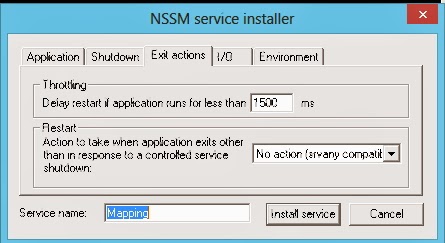
Then type:  nssm install Mapping
Note that 'Mapping'  is the name of the Service you can name it anyway you like. A dialog will open.


Now choose the created batch file in the Path option. You can also change the name of the service again here.


Now go to the Exit actions tab in the nssm tool and at the Restart dropdownbox, choose 'No action (srvany compatible)' This will prevent the service from keep trying to delete and make the mapping it it fails.


Click on the 'Install service' button to create the Service.


Open the Services.msc and check the Service. Make sure it is set to the 'Automatic' Startup Type


Next we open the IBM HTTP Server 7.0 Service ans set the Startup type to 'Automatic (Delayed Start)'

This is needed to make sure the Mapping service has created the mapping before the webserver that serves the Maximo documents is starting up. 


Now we have a mapping ready for us whenever the server is running and after a reboot the mapping will be created even if no user logs on to the server.


Step 2. Webserver configuration.

Now we need to configure Maximo to use the Mapping, this is standard Doclnks configuration, but i will post it here anyway, just to show you it works :)

I run a Notepad ++ as Administrator and navigate to D:\ibm\HTTPServer\conf. I open the httpd.conf file (make sure you create a backup first)


On line 221 modify the DocumentRoot like so:

#
# DocumentRoot: The directory out of which you will serve your
# documents. By default, all requests are taken from this directory, but
# symbolic links and aliases may be used to point to other locations.
#
#DocumentRoot "D:/IBM/HTTPServer/htdocs"
DocumentRoot "E:\DOCLINKS7"


on line 249 modify the Directory like so:
#
# This should be changed to whatever you set DocumentRoot to.
#
#<Directory "D:/IBM/HTTPServer/htdocs">
<Directory "E:\DOCLINKS7">

Here is an overview of the file:


Save the httpd.conf and close the Notepad ++

 
Step 3. Configure Maximo.

Like in step 2 this is also standard Maximo Doclinks configuration.

I modify the following properties in the System Properties:

mxe.doclink.doctypes.defpath  ->  E:\DOCLINKS7
mxe.doclink.doctypes.topLevelPaths  ->  E:\DOCLINKS7


and the following property:

mxe.doclink.path01  ->  E<PATH>\DOCLINKS7 = http://MaximoServerName/

where the MaximoServerName if the name of your Maximo server.


You can also set the mxe.doclink.path01 in the maximo.properties file, this can be nice when rolling back databases.
That would look like this:


And finally you set the Folders in each application that uses Attached Documents in Maximo.


Step 4. Completing.

Now rebuild and redeploy Maximo.

When finished, reboot the server completely to test everything.

When logged on on the server you will see the drive as a 'Disconnected Network Drive' 
This is normal, and when you click on it, it should show the content of the folder.


So there you have it, a UNC path as a Doclinks location.

GNZ.


Monday, December 16, 2013

Maximo 7.5.0.5 on Windows Server 2012

Goal: 
Install Maximo 7.5.0.5 on Windows Server 2012. 

Problem:
When looking at the Platform Matrix (dated 31 October 2013, check this link for the most recent version: http://www-01.ibm.com/support/docview.wss?uid=swg27014419), Windows 2012 is supported for Maximo from version 7.5.0.3 and up.

But wait! as it turns out, it states it runs on 'Support only'  So you will have to figure it out for yourself how to get it running.
And on top of that, Windows 2012 is even supported as Admin Workstation...

Here is a part of the Matrix:


So be very aware of this comment! I had me fooled... :(

But hey, if we can get the Websphere running with Maximo 7.5.0.5, we have support. :)

Notes for this document:
Servername:  MYWINDOWS2012SERVER, or masked in screenshots because it is a company server and the client his server.
Database: Oracle 11g2
User: Local Admin (Make sure you have the permissions you need!)


Solution:
I got it running in the end. I ran into a few issues and will show you how I solved them below. 

First I started of like I normally would, run the launchpad64.exe as an administrator.


Then choose "Install Product" and then click "Middleware"
Choose you Language, accept the License Agreement and set your Workspace. (I used D:\ibm\tivoli\mwi\workspace)
  
After clicking 'Next' I got the following message:


To get more details on this, open the mwi.log from D:\ibm\tivoli\mwi\workspace\MYWINDOWS2012SERVER
This is part of the log:

com.ibm.ac.si.install.InstallFailedException: 
at com.ibm.ac.si.install.SIInstaller.initialize(SIInstaller.java:2598)
at com.ibm.ac.si.install.SIInstaller.<init>(SIInstaller.java:2319)
at com.ibm.ac.si.install.SIInstaller.install(SIInstaller.java:876)
at com.ibm.ac.si.install.BootstrapApplication.performInstallOperation(BootstrapApplication.java:330)
at com.ibm.ac.si.install.BootstrapApplication.performOperation(BootstrapApplication.java:190)
at com.ibm.ismp.mwi.BootstrapDeploymentEngine.execute(BootstrapDeploymentEngine.java:134)
at com.installshield.wizard.RunnableWizardBeanContext.run(Unknown Source)
Caused by: com.ibm.ac.si.install.UnrecognizedOSException: ACUINI0045E The current OS is unrecognized by this application: Name = Windows Server 2008 ; Architecture = amd64 ; Version = 6.2 build 9200 
at com.ibm.ac.si.install.SIInstaller.validateSupportedOS(SIInstaller.java:2751)
at com.ibm.ac.si.install.SIInstaller.initialize(SIInstaller.java:2400)
... 6 more
(Thu Dec 12 14:48:28 CET 2013) DefaultVariableProxy [FINEST]: setValue[variable:deploymentEngineDeployed, newValue:false, oldValue:false, source:com.ibm.ismp.mwi.BootstrapDeploymentEngine]
(Thu Dec 12 14:48:28 CET 2013) DefaultVariableProxy [FINEST]: setValue[variable:deploymentEngineErrorMessage, newValue:CTGIN9077E: Deployment Engine is not functioning properly. Please delete the DE folder in MWI workspace and restart the MWI installer., oldValue:CTGIN9077E: Deployment Engine is not functioning properly. Please delete the DE folder in MWI workspace and restart the MWI installer., source:com.ibm.ismp.mwi.BootstrapDeploymentEngine]
(Thu Dec 12 14:48:28 CET 2013) com.ibm.ismp.mwi.Lathe [FINEST]: INSTALL_GENERAL_FAILURE
(Thu Dec 12 14:48:28 CET 2013) com.ibm.ismp.mwi.Lathe [SEVERE]: 
(Thu Dec 12 14:48:28 CET 2013) com.ibm.ismp.mwi.Lathe [SEVERE]: D:\ibm\tivoli\mwi\workspace\MYWINDOWS2012SERVER\DE\acsi\jre\copyright (The system cannot find the path specified.)
java.io.FileNotFoundException: D:\ibm\tivoli\mwi\workspace\MYWINDOWS2012SERVER\DE\acsi\jre\copyright (The system cannot find the path specified.)
at java.io.FileOutputStream.<init>(FileOutputStream.java:179)
at java.io.FileOutputStream.<init>(FileOutputStream.java:131)
at com.ibm.ismp.mwi.BootstrapDeploymentEngine.copyFile(BootstrapDeploymentEngine.java:334)
at com.ibm.ismp.mwi.BootstrapDeploymentEngine.execute(BootstrapDeploymentEngine.java:163)
at com.installshield.wizard.RunnableWizardBeanContext.run(Unknown Source)
(Thu Dec 12 14:48:28 CET 2013) com.ibm.ismp.mwi.Lathe [SEVERE]: D:\ibm\tivoli\mwi\workspace\MYWINDOWS2012SERVER\DE\acsi\jre\notices.txt (The system cannot find the path specified.)
java.io.FileNotFoundException: D:\ibm\tivoli\mwi\workspace\MYWINDOWS2012SERVER\DE\acsi\jre\notices.txt (The system cannot find the path specified.)
at java.io.FileOutputStream.<init>(FileOutputStream.java:179)
at java.io.FileOutputStream.<init>(FileOutputStream.java:131)
at com.ibm.ismp.mwi.BootstrapDeploymentEngine.copyFile(BootstrapDeploymentEngine.java:334)
at com.ibm.ismp.mwi.BootstrapDeploymentEngine.execute(BootstrapDeploymentEngine.java:166)

at com.installshield.wizard.RunnableWizardBeanContext.run(Unknown Source)


Seems to me that there is a problem writing/accessing files. Also there is a line that the OS is not recognized...

First I closed all the windows, and opened an explorer.
I browse to the IBM_MAM_V7.5.0_Launchpad\Install\MWI directory and right click the mwi-AMD64.exe file and choose 'Properties' 

Set the Compatibility on 'Windows 7' and check the 'Run this program as an administrator' 


Next I 'Googled' and found this page: http://www-01.ibm.com/support/docview.wss?uid=swg21650567

I used some part of it for my solution.

Open a dosbox as an Administrator.
Browse to the IBM_MAM_V7.5.0_Launchpad\Install\MWI directory and run:
mwi-AMD64.exe -V dependencyChecks=false

This is case-sensitive!

The installShield will now start. Choose your language, accept the License agreement, set you workspace, click Next and behold, it runs! :)


I'll install the J2EE Server only


I use the default settings and set the installation locations to the D:-partition using default paths in all the next screens. I suppose you can choose what you like, but this is the configuration I tested.

When you reach the screen with the option to Deploy the plan, hold on for a sec. We need to change something.


Open a explorer and go to the D:\ibm\tivoli\mwi\workspace\<hostname>\deploymentPlan\MachinePlan_<hostname>\MachinePlan_<hostname>.xml 

Open this xml with a editor like Notepad++. Make sure you run Notepad++ as an administrator!

Update the value of the below two properties to "true" :

<property value="true" name="suppress.step_00001_MWI_7.1_Prereqs"/>
<property value="true" name="suppress.step_00002_DiskSpace_Check"/> 


Save the file.

Go back to the screen that is still open en click on [Next] to deploy the plan. A summary list of the plan will be displayed next, click the [Deploy] button to start.


Ok, so that was Websphere, you could now install Maximo on a supported Admin Workstation and deploy the ear file here. When you use Maximo 7.5.0.3 or higher IBM will support it.

But hey, they are not giving away Servers and Admin workstations for free, so it would be nice if we could use this Windows 2012 server as Admin Workstation.
I want to try this for the Test environment, and if it can be done without to much 'quick and dirty' solutions and Maximo can be patched and all, this would be a useful test environment.


Maximo 7.5.0.0 installation
Again I started of like I normally would, run the launchpad64.exe as an administrator. Click on the "Install Product"  option on the left, and choose "Maximo Asset Management"  

The Install Anywhere dialog shows and shows the " Preparing to install". When done the following error appears:


I close all the windows, and open an explorer.
Browse to the IBM_MAM_V7.5.0_Launchpad\Install\MAM directory and right click the install_win64.exe file and choose 'Properties' 

Set the Compatibility on 'Windows 7' and check the 'Run this program as an administrator' 


Open a dosbox as Administrator and browse to IBM_MAM_V7.5.0_Launchpad\Install\MAM directory and run: install_win64.exe

The Install Anywhere dialog shows up again and now the error is not displayed.I choose a language and click [Next]

I click through the screens like I normally would when installing Maximo.


At the "Run Configuration Step" check all three boxes.


After a few minutes the installer is done.


Now to finish the installation we open a dosbox as and Administrator.
Navigate to D:\ibm\SMP\scripts\  and run taskRunner.bat CONTINUE STOPONERROR


Eventually the taskRunner will stop with a message we can also find in the D:\ibm\SMP\logs\CTGInstallTrace00.log

CTGIN0219I: Deploying process solution installation package D:\IBM\SMP\pmp\process_automation_engine_7.5.0.0.zip.

StandardError: CTGIN0143E: An action error ocurred during the processing of a deployment operation. Action identifier: "null". Action display name: "Create Package Log Directory".


Dec 16, 2013 11:12:37 AM com.ibm.tivoli.ccmdb.install.foundation.config.pmp.ACfgProcessManagerPackageConfig Result from install PSI
FINE: NOTE ^CTGIN0005E: The deployment of D:\IBM\SMP\pmp\MAM.zip failed. The error text is CTGIN0143E: An action error ocurred during the processing of a deployment operation. Action identifier: "null". Action display name: "Create Package Log Directory"..^n^

Dec 16, 2013 11:12:37 AM com.ibm.tivoli.ccmdb.install.foundation.config.pmp.ACfgProcessManagerPackageConfig runConfigurationStep

Seems like issues with file rights again...

Next I check the D:\ibm\SMP\CTG_DE\acsi\logs\<USER_NAME>\de_trace.log

There i get:

at com.ibm.ac.si.cm.TouchPointTask.workQueueError(TouchPointTask.java:1688)
at com.ibm.ac.si.cm.TouchPointTask.run(TouchPointTask.java:949)
at java.lang.Thread.run(Thread.java:736)
Caused by: com.ibm.ac.common.hosts.CreationFailedException: 
at com.ibm.ac.tp.basehost.AbstractHosts.createHostedResource(AbstractHosts.java:234)
at com.ibm.ac.si.cm.CreateCommand.execute(CreateCommand.java:122)
at com.ibm.ac.si.cm.TouchPointController.callTouchPoint(TouchPointController.java:287)
at com.ibm.ac.si.cm.TouchPointTask.run(TouchPointTask.java:815)
... 1 more
Caused by: com.ibm.ac.tp.basehost.ActionErrorException: action_processor_failure, action=addDirectory, actionId=null
at com.ibm.ac.tp.basehost.ActionHandler.createException(ActionHandler.java:779)
at com.ibm.ac.tp.basehost.ActionHandler.handleGeneralException(ActionHandler.java:1084)
at com.ibm.ac.tp.basehost.ActionHandler.handlePhase(ActionHandler.java:308)
at com.ibm.ac.tp.basehost.ActionProcessor.handleAction(ActionProcessor.java:258)
at com.ibm.ac.tp.basehost.ActionProcessor.run(ActionProcessor.java:122)
at com.ibm.ac.tp.basehost.AbstractHosts.createHostedResource(AbstractHosts.java:218)
... 4 more
Caused by: com.ibm.ac.si.ap.service.variable.VariableNotDeclaredException: ACUASI0132E Variable has not been declared or has no default value assigned: PkgLogDirectory
at com.ibm.ac.si.ap.service.variable.impl.VariableContextImpl.getValue(VariableContextImpl.java:258)
at com.ibm.ac.si.ap.service.variable.impl.VariableContextImpl.getReplacementValue(VariableContextImpl.java:371)
at com.ibm.ac.si.ap.service.variable.impl.VariableContextImpl.evaluateRecursive(VariableContextImpl.java:335)
at com.ibm.ac.si.ap.service.variable.impl.VariableContextImpl.evaluate(VariableContextImpl.java:303)
at com.ibm.ac.si.ap.action.VariableServiceHelper.resolveVariable(VariableServiceHelper.java:64)
at com.ibm.ac.si.ap.action.file.PathElements.getResolvedName(PathElements.java:152)
at com.ibm.ac.si.ap.action.file.PathElements.getResolvedFile(PathElements.java:176)
at com.ibm.ac.si.ap.action.AddDirectoryAction.installEmptyDirectory(AddDirectoryAction.java:489)
at com.ibm.ac.si.ap.action.AddDirectoryAction.install(AddDirectoryAction.java:81)
at com.ibm.ac.tp.basehost.InstallActionHandler.handlePhaseAction(InstallActionHandler.java:103)
at com.ibm.ac.tp.basehost.ActionHandler.handlePhase(ActionHandler.java:244)

... 7 more

A variable named PkgLogDirectory has no default value...

This must be somewhere in the MAM.zip package. This package can be found in D:\ibm\SMP\pmp

First create a backup of the MAM.zip file, then open the MAM.zip and go to the META-INF directory. There we find a file named "packageIU.xml"

Important is to not extract the zip and zip it again after you edited the file. But keep the zip in tact and just handle it like it was a folder.

Copy that file to the Desktop

Open a Notepad++ as administrator 

This is important, all files edited for Maximo, also files that we edit later on for rebuilding, need to be edited as administrator, not as the logged-in user, even if that user is local administrator.

We change two variables here. Because when we only change the PkgLogDirectory the taskRunner wants a default for the ModuleInstallDir.
Below are lines of code i used. I commented out the the original lines.

        <!-- This variable stores the location of any module/package specific -->
        <!-- files or code. This may or may not be used depending on the      -->
        <!-- specific package.                                                -->
<variable name="ModuleInstallDir">
           <parameter defaultValue="d:\IBM\smp\solutions\installedApps\MAM75_Package"/>
  <!--
           <derivedVariable>
                <expression condition="$(windows_TypeCheck)">$(CCMDBInstallLocation)\solutions\installedApps\$(PkgShortName)</expression>
           </derivedVariable> -->
        </variable>

        
        <!-- The path to the directory the contains the logs for this specific -->
        <!-- package. This is used if the package install writes to its own    -->
        <!-- specific install logs.                                            -->
        <variable name="PkgLogDirectory">
            <parameter defaultValue="d:\IBM\smp\solutions\logs\MAM75_Package"/>
            <!--<derivedVariable>
                <expression condition="$(windows_TypeCheck)">$(CCMDBInstallLocation)\solutions\logs\$(PkgShortName)</expression>
            </derivedVariable> -->

        </variable>


Essentially we comment out the existing line and add out own line. Instead of a Derived variable we use a defaultValue variable here.
Here again the line in a screenshot.


Next copy the MAM.zip to the desktop and open it, go to the META-INF directory and copy the 'packageIU.xml" here and replace the existing file. 
We cannot use the MAM.zip in the original directory because then the file is not placed in the zip with the right permissions.

Now copy the MAM.zip from the desktop back to the D:\ibm\SMP\pmp overwriting the existing MAM.zip

Again open a dosbox as and Administrator.
Navigate to D:\ibm\SMP\scripts\ and run "taskRunner.bat CONTINUE STOPONERROR"

and, whohoooo, all efforts are not in vain, the taskRunner continues.


After a while the taskRunner is finished.

Go to D:\ibm\SMP\bin and run "solutionInstaller.bat -action showinstalled -type all" to check the installation;


As a test if all configuration is correct I will install patch 7.5.0.5. If this installs without any problems the configuration must be good.


Install 7.5.0.5

Open the 7.5.0.5-TIV-MAM-FP0005 directory and change the properties of the install_win64.exe so it runs in Windows 7 compatibility mode


Next I open a dosbox as an Administrator and navigate to the 7.5.0.5 patch directory and run the "install_win64.exe"

Now click through the screens like you normally would when installing a patch


At the end I get :

CTGIN2225E: Deployment of application MAXIMO failed.

WASX7023E: Error creating "SOAP" connection to host "MYWINDOWS2012SERVER"; exception information: com.ibm.websphere.management.exception.ConnectorNotAvailableException: com.ibm.websphere.management.exception.ConnectorNotAvailableException: ADMC0016E: The system cannot create a SOAP connector to connect to host  at port 8879.
WASX7213I: This scripting client is not connected to a server process; please refer to the log file D:\IBM\SMP\wasclient\logs\wsadmin.traceout for additional information.
WASX8011W: AdminTask object is not available.
WASX7303I: The following options are passed to the scripting environment and are available as arguments that are stored in the argv variable: "[install, MAXIMO, ctgNode01, MXServer, D:/IBM/SMP/maximo/deployment/default/maximo.ear, maximo_host, webserver1]"
Admin objects not loaded. Connection to Websphere is bad
Sleeping and retrying
Microsoft (R) Windows Script Host Version 5.8
Copyright (C) Microsoft Corporation. All rights reserved.

WASX7023E: Error creating "SOAP" connection to host "MYWINDOWS2012SERVER"; exception information: com.ibm.websphere.management.exception.ConnectorNotAvailableException: com.ibm.websphere.management.exception.ConnectorNotAvailableException: ADMC0016E: The system cannot create a SOAP connector to connect to host MYWINDOWS2012SERVER at port 8879.
WASX7213I: This scripting client is not connected to a server process; please refer to the log file D:\IBM\SMP\wasclient\logs\wsadmin.traceout for additional information.
WASX8011W: AdminTask object is not available.
WASX7303I: The following options are passed to the scripting environment and are available as arguments that are stored in the argv variable: "[install, MAXIMO, ctgNode01, MXServer, D:/IBM/SMP/maximo/deployment/default/maximo.ear, maximo_host, webserver1]"
Admin objects not loaded. Connection to Websphere is bad
Sleeping and retrying
Microsoft (R) Windows Script Host Version 5.8
Copyright (C) Microsoft Corporation. All rights reserved.

WASX7023E: Error creating "SOAP" connection to host "MYWINDOWS2012SERVER"; exception information: com.ibm.websphere.management.exception.ConnectorNotAvailableException: com.ibm.websphere.management.exception.ConnectorNotAvailableException: ADMC0016E: The system cannot create a SOAP connector to connect to host MYWINDOWS2012SERVER at port 8879.
WASX7213I: This scripting client is not connected to a server process; please refer to the log file D:\IBM\SMP\wasclient\logs\wsadmin.traceout for additional information.
WASX8011W: AdminTask object is not available.
WASX7303I: The following options are passed to the scripting environment and are available as arguments that are stored in the argv variable: "[install, MAXIMO, ctgNode01, MXServer, D:/IBM/SMP/maximo/deployment/default/maximo.ear, maximo_host, webserver1]"

Admin objects not loaded. Connection to Websphere is bad

Could be that Maximo cannot be installed in Websphere through the installer. When I run the "solutioninstaller -action showinstalled -type all" it shows that the Maximo patch is installed.


When trying to go to the Websphere Integrated Solutions Console the page cannot be displayed. I decide to reboot the server first.

Next I did a rebuild and I installed the Maximo application. Maximo is running now :)


So there you have it, Websphere and Maximo on Windows Server 2012.


GNZ