Install Maximo 7.6 with DB2 database on a Windows 2012 server in Hyper V
Existing Configuration:
Previously I used VMWare for my VM's. With my Windows Phone development I use hyper V for Emulators. Hyper-V can also be used for other virtual Machines, so why not use it for Maximo VM's
My Hyper-V machine setup:
- Windows Server 2012
- 8GB RAM (dynamic)
- One disk, 85 GB
Used Documents:
Blog IBM on installing: https://www.ibm.com/developerworks/community/blogs/a9ba1efe-b731-4317-9724-a181d6155e3a/entry/installing_maximo_7_6_a_first_look?lang=en
I tried to follow this blog to get my Maximo running
I tried to follow this blog to get my Maximo running
I extracted all the zip files listed below in one directory:
- MAM_7.6.0.0_WIN64.zip
- Middl_Inst_DB2_105_Win_x86-64.zip
- Middl_Inst_WAS_855_1of3_Win.zip
- Middl_Inst_WAS_855_2of3_Win.zip
- Middl_Inst_WAS_855_3of3_Win.zip

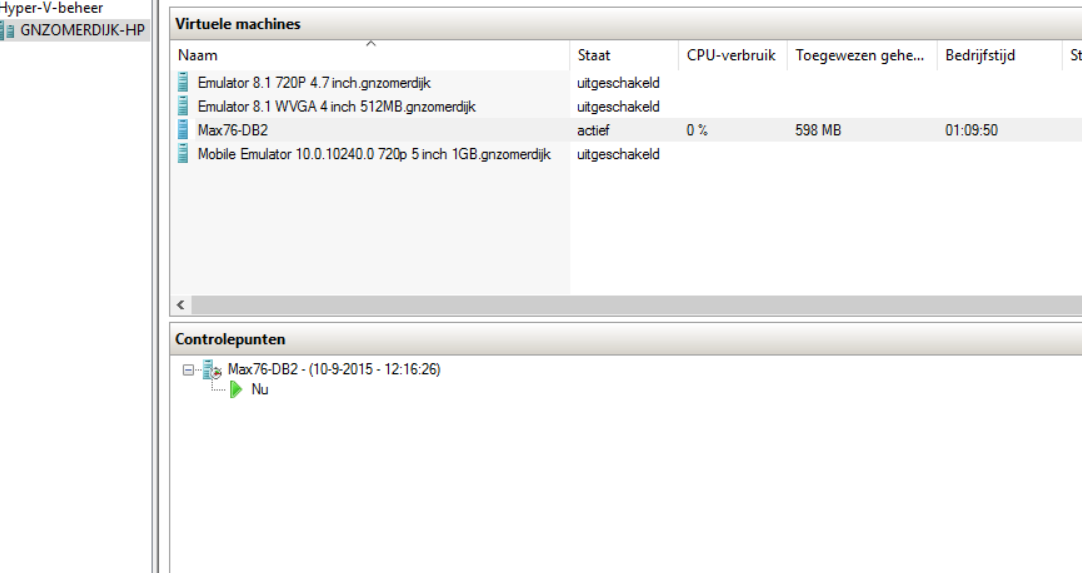
Next I create a Snapshot in Hyper-V.
So if I want to start again, I just revert to the snapshot. (screenshot below is in Dutch)
Step 2: Installing
Right click on launchpad64.exe and choose "run as Administrator"

Next I follow the steps provided in the IBM Blog (see link at top of this post) I will only describe any abnormalities in details. Otherwise I just follow the IBM Blog.
I select "Install Product" on the left side, leave the options as is and click the link "Install IBM Maximo Asset Management components"

I make sure all packages are selected and click [Next]

On the Install Packages screen accept the license agreements and click [Next]

I accept the defaults and click [Next]

Again not modifying anything and clicking [Next]
In the following also clicking [Next] (using English language)
In the following screen the Features are shown, I do not change anything, and click [Next]
Now the DB2 installation page is shown. I leave the defaults and enter a password that meets the complexity rules of the Windows server and I check the option "Use the DB2 administration server user password" See at the bottom of this blog post what happend when i entered a simple password.

I accept the defaults on the IBM HTTP Server screen and click [Next]
Finally, on the summary page I click [Install]

The files are being retreived and installed


After a while everything is installed

Step 3: Prepare Websphere
I Click [Finish] and the "IBM Tivoli process automation engine configuration utility" launches

There I click on "Prepare Websphere Application Server for configuration"
I leave everything as-is and click [Next]

On the next screen I scroll down and enter the password for Websphere and click [Next]

I want the service to run as the local system account and click [Next]

Next make you choice for Authentication, I use the default and click [Next]

I leave all the options checked and click [Finish]


Step below takes a very long time:

Finally I got: (one hour later)

Step 4: Configure websphere
When finished the "IBM Tivoli process automation engine configuration utility" is shown
again. The Prepare option is gone, now I click on the "Configure a new Deployment" link

I leave the defaults in the next screen and enter a password in the "Use a default password value for all password values" and click [Finish]

The next screen shows some configuration options, I check the "Create sample data in the database" and click [Next]

Now the DB2 database information is shown,
I change the database password to "maximo" and click [Next]

I check the box "Enable full text search" and click [Next]

I leave the next screen as-is and click [Next]

I change the passwords for easy reference and click [Next]

I set the Base language to English and select Dutch as Additional Language


In the next screen i first only select Validate, like on the IBM blog and click [Finish]

I get an Validation error

The error is on the DB2 Instance
[10:39:42 AM CEST] DB2 Instance-CTGIN2032E: The port number is not listening on the host.
[10:39:46 AM CEST] Apply Deployment Operations-CTGIN5135E: Error configuring the database for DB2 Text Search. Unable to connect to the database specified.
[10:39:46 AM CEST] Apply Deployment Operations-CTGIN5009E: Validation of properties for reconfiguration failed. See previous messages for information on the failure.
So it seems because I enabled Full Text Search the database must exist...
I go back and disable the Full Text Search

then I go back to the Validation and click [Finish] again.
Now the following error shows:
[10:48:27 AM CEST] Apply Deployment Operations-Starting validation and configuration ....
[10:48:29 AM CEST] DB2 Instance-CTGIN2032E: The port number is not listening on the host.
[10:48:30 AM CEST] Apply Deployment Operations-CTGIN5009E: Validation of properties for reconfiguration failed. See previous messages for information on the failure.
So DB2 is not available
I change the port to 50000 and click [Finish] again

Again a error
[10:50:57 AM CEST] Apply Deployment Operations-Starting validation and configuration ....
[10:51:00 AM CEST] Apply Deployment Operations-Validating application server parameters...
[10:51:10 AM CEST] Apply Deployment Operations-CTGIN5059I: Property validation check completed successfully. All required properties were found.
[10:51:10 AM CEST] Apply Deployment Operations-CTGIN2094I: The preCheck function completed successfully.
[10:51:10 AM CEST] Apply Deployment Operations-CTGIN5060E: Authentication to WebSphere Application Server Deployment Manager win2k12.local.com with user name wasadmin failed because the user doesn't exist or the password is incorrect.
[10:51:10 AM CEST] Apply Deployment Operations-CTGIN5009E: Validation of properties for reconfiguration failed. See previous messages for information on the failure.
[10:51:10 AM CEST] Apply Deployment Operations-Validating database parameters...
[10:51:13 AM CEST] Apply Deployment Operations-CTGIN2102E: Error: Cannot connect to the database with user maximo.
[10:51:13 AM CEST] Apply Deployment Operations-CTGIN5009E: Validation of properties for reconfiguration failed. See previous messages for information on the failure.
Cannot connect to the database... that is no suprise because the database isn't there yet... I go and check the IBM blog.
I cancel the screen and click on "Configure a New Deployment" again. No I check the "Create and configure the database" and fill in the Windows Server information and click [Finish]
In the screenshot on the IBM blog this was not filled in, But I guess we need to create the database here.

Now I fill in the steps again. Now some steps have som additional information, like on the screenshots on the IBM blog.
I leave all the defaults (but do check the "Enable full text search" and set some passwords to other values.)
No the validation goes and I get a question about wanting to complete the other steps. I click [Yes]

I check all the boxes and click [Finish]

All options will now be installed.
I started on 11:09, the progss can be viewed in the Console below


[11:21:10 AM CEST] Apply Deployment Operations-CTGIN2321E: The port number 50000 is in use on win2k12.local.com.
I go back to the DB2 Instance page and change the port to 50005 and click [Finish]
This was the port we set up earlier for ctginst1

Now the setup continues. Something that ditn't not match in the IBM Blog, but I should have seen it when following the blog. So make sure you think about what you fill in :)
Now the user fails, so must be a password I missed.

[11:53:24 AM CEST] Apply Deployment Operations-CTGIN5398E: Unable to connect to the database. The userid 'maximo' and password combination were not accepted by the database system.
[11:53:24 AM CEST] Apply Deployment Operations-[jcc][t4][2013][11249][4.11.69] Connection authorization failure occurred. Reason: User ID or Password invalid. ERRORCODE=-4214, SQLSTATE=28000
[11:53:24 AM CEST] Apply Deployment Operations-CTGIN2102E: Error: Cannot connect to the database with user maximo.
I re-enter the password on the DB2 information and click [Finish] again.
Now the installer get to the part of creating the database

This is part of the log when rechecking the maximo user information:
[11:56:20 AM CEST] Apply Deployment Operations-Starting validation and configuration ....
[11:56:23 AM CEST] Apply Deployment Operations-CTGIN5110I: Successfully connected to the database.
[11:56:23 AM CEST] Apply Deployment Operations-CTGIN5109I: DB2 database server version 10.5.400.191 meets the requirements for DB2 Text Search support.
[11:56:23 AM CEST] Apply Deployment Operations-Validating application server parameters...
[11:56:23 AM CEST] Apply Deployment Operations-Application server parameter validation successful.
[11:56:23 AM CEST] Apply Deployment Operations-Validating database parameters...
[11:56:24 AM CEST] Apply Deployment Operations-CTGIN5398E: Unable to connect to the database. The userid 'maximo' and password combination were not accepted by the database system.
[11:56:24 AM CEST] Apply Deployment Operations-[jcc][t4][2013][11249][4.11.69] Connection authorization failure occurred. Reason: User ID or Password invalid. ERRORCODE=-4214, SQLSTATE=28000
[11:56:27 AM CEST] Apply Deployment Operations-CTGIN5398E: Unable to connect to the database. The userid 'maximo' and password combination were not accepted by the database system.
[11:56:27 AM CEST] Apply Deployment Operations-[jcc][t4][2013][11249][4.11.69] Connection authorization failure occurred. Reason: User ID or Password invalid. ERRORCODE=-4214, SQLSTATE=28000
[11:56:27 AM CEST] Apply Deployment Operations-Database parameter validation successful.
[11:56:27 AM CEST] Apply Deployment Operations-Saving configuration parameters...
[11:56:27 AM CEST] Apply Deployment Operations-Starting configuration...
[11:56:28 AM CEST] Apply Deployment Operations-CTGIN5398E: Unable to connect to the database. The userid 'maximo' and password combination were not accepted by the database system.
[11:56:28 AM CEST] Apply Deployment Operations-[jcc][t4][2013][11249][4.11.69] Connection authorization failure occurred. Reason: User ID or Password invalid. ERRORCODE=-4214, SQLSTATE=28000
[11:56:28 AM CEST] Apply Deployment Operations-CTGIN5398E: Unable to connect to the database. The userid 'maximo' and password combination were not accepted by the database system.
[11:56:28 AM CEST] Apply Deployment Operations-[jcc][t4][2013][11249][4.11.69] Connection authorization failure occurred. Reason: User ID or Password invalid. ERRORCODE=-4214, SQLSTATE=28000
[11:56:28 AM CEST] Apply Deployment Operations-CTGIN5010I: Validation of pending updates completed successfully.
[11:56:28 AM CEST] Apply Deployment Operations-CTGIN5011I: Saving updated property values.
[11:56:29 AM CEST] Apply Deployment Operations-CTGIN5068I: The configuration of the environment has started.
[11:56:31 AM CEST] Apply Deployment Operations-CTGIN5071I: System users required for DB2 access were created successfully and assigned to appropriate system user groups.
[11:56:32 AM CEST] Apply Deployment Operations-CTGIN2089I: Process automation engine database instance has previously been created. Instance creation task skipped.
[11:56:32 AM CEST] Apply Deployment Operations-CTGIN2087I: Process automation engine database has previously been created. Database creation task skipped.
[11:56:33 AM CEST] Apply Deployment Operations-CTGIN2135I: Table space MAXDATA created successfully.
[11:56:33 AM CEST] Apply Deployment Operations-CTGIN2135I: Table space MAXINDEX created successfully.
[11:56:33 AM CEST] Apply Deployment Operations-CTGIN2135I: Table space MAXTEMP created successfully.
[11:56:33 AM CEST] Apply Deployment Operations-CTGIN2085I: Process automation engine database user has previously been created. User creation task skipped.
[11:56:35 AM CEST] Apply Deployment Operations-CTGIN2123I: The database user maximo was configured.
[11:56:35 AM CEST] Apply Deployment Operations-CTGIN5426I: Multi-tenancy is not enabled.
[11:56:36 AM CEST] Apply Deployment Operations-CTGIN5372I: Running the maxinst task to create the database. This task can take an extended period of time to complete, based upon your environment.
The process started at 11:56 and finished at 13:59. So it took over 2 hours to complete

I Click [OK]
Maximo should be running now.
I navigate to http://win2k12.local.com/maximo/ and ad the site to the trusted sites

And I login to maximo with the maxadmin account

Up and Running.

Up and Running.
On my first try I got the following error:
Error during "install" phase:
An error occured while creating the user "db2admin" for the DB2 Administration Server. The return value is "5150"

I tried it again and got:
Explanation: The Ant process exited with code 1 while running C:\IBM\SQLLIB\TPAEAutomation\DB2_10\DB2_10.xml

When enetering 'dbadmin' as password i got the error
password too short
I made the password longer, but the same error occured. Then I used a complex password and it was accepted. So in the procedure above I used a complex password and the installation went ok.
So note that the installer will accept a standard password, but when installing it can fail.
GNZ
