Create an App for my Windows Phone 8.1
Example:
I would like to make my own Windows Phone app.
See my first post on Windows Phone App Development here:
http://sometimesiliketopretend.blogspot.com/2014/08/how-to-start-with-windows-phone.html
My first idea for a app was this:
To build a radio player that will play streams from the internet. There are many players for Windows Phone, but the only one with a sleep timer is TuneIn radio, and that app sucks on Windows Phone and hasn't been updates in a long time.
All the other internet radio streaming apps do not have a working sleep timer. And I like to listen to radio when falling a sleep. So I need a sleep timer in my app.
But then I did a another good search in the appstore, and found this app:
http://www.windowsphone.com/nl-nl/store/app/bradio-internet-radio/e7da6f45-c9ca-47f5-af29-a7e003af2479
(Sorry for the Dutch link, but I couldn't find a english link...)
So no need to re-create something that is already there. I need a new idea for my first app.
New idea: The Manual Automatic
That was when I came up for with the idea of creating a simple Manual Tracker app. Sometimes I need to lookup something in a manual, like the default admin password for a router after it has been factory reset, or the bluetooth connction code for a device. These things arent used often, but are handy to have stored in a central place.
I personally have those paper books and manuals in a map stored in a closet. When I need some information, I need to browse the map and lookup the needed information. Also when I finally find the right manual I need to skip through it past all the foreign languages to find that one page or paragraph where the needed info can be found.
I want to create a app to simplify this.
Solution:
Create an App for the Windows Phone where I can store a picture / photo of the page of a user manual i need.
I want to take a picture, add a title and a description to it and store it. Then I need to easily search on my added data in order to find the information I need without having to browse through all my hardcopy manuals.
General Outline
My goal for this first part is to setup the general outline of my idea. Do some thinking on the design and the functionality I need.
Must haves:
- Store data on the phone.
- Take picture from the App and save to a record.
- Add a manual with a description and picture.
- Search on manual and description to easily find manuals
- Delete Manuals
Nice to Haves:
- Backup to a Cloud service. (Onedrive, Dropbox?)
- Universal App, so it can be used on Windows 8.1 and Windows Phone 8.1. But I need some central storage for this.
- Multi language setup.
The basic setup
First of I create a Project in Visual Studio and use the Universal Blank App template. I will not use the Windows part of it for now, but I want to be ready for it :)

For my initial setup I need the following pages:
- Page to add new Manuals
- Page to view Manuals
- Page to Search Manuals
I want to be able to search for manuals directly so that option must be on the mainpage along with the option to add manuals.
So to start off I will create a "Command bar", with an 'Add' option. This is the bar at the bottom of the app, with the three dots when minimized.
You can add the xaml for the command bar directly or, go to the properties of the page:

Then in the properties of the commandbar, scroll down and modify the 'PrimaryCommands' to add a button

Then I add a Name and a "Click event" to it, directly in the xaml. For the click event, press CTRL + space between the quotes if it doesn't show automatically, and create the new event handler by pressing F12.

You can go to the definition to jump straight to the MainPage.xaml.cs to fill in code for the event. I will do that later on.

Next I add some basic labels and a Textbox with a button that I can use to search for manuals.

On the "Search" button I create an event handler, by putting my cursor in the xaml for the Click event and pressing F12.

Now I add a new xaml page on which the controls will be shown to add data.
Right Click on the Windows Phone part in the Solution Explorer and choose Add -> New Item. I choose a Blank page and call it AddManual.xaml

On that page I create fields in order to put data in.

When pushing the "Add" button we now need to navigate to the addManual.xaml page. I go to the Event Handler for the "Add" button on the MainPage.xaml.cs and add the following line:
Frame.Navigate(typeof(AddManual));
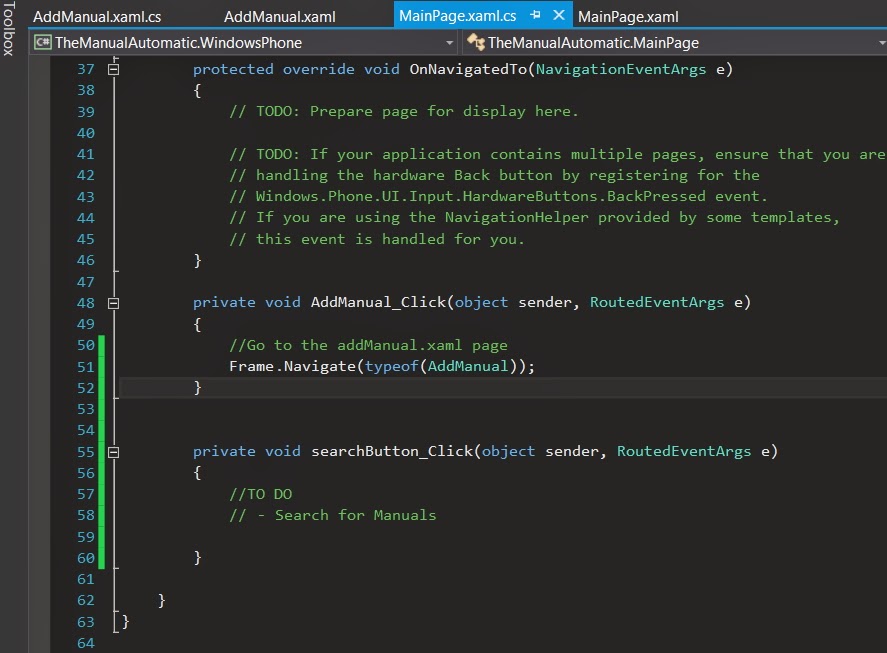
And in the AddManual.xaml.cs, in the "Add" button Event Handler I add the following line to naviagte back when we are done adding a item:
Frame.Navigate(typeof(MainPage));
When pushing the "Add" button we now need to navigate to the addManual.xaml page. I go to the Event Handler for the "Add" button on the MainPage.xaml.cs and add the following line:
Frame.Navigate(typeof(AddManual));
And in the AddManual.xaml.cs, in the "Add" button Event Handler I add the following line to naviagte back when we are done adding a item:
Frame.Navigate(typeof(MainPage));
Now to test it, I build the application (BUILD -> Build Solution, or press the F7 key)

And then I want to run the application in the emulator, but I only see the Windows options to run it, not the Windows Phone options.

I need to set the Windows Phone part of my universal app as the startup project, so from the menu referenced in the previous image, choose "Startup Project -> Windows Phone 8.1
Now the run options for the Windows Phone will become available.

Now I run it, and it works :)

When I click on the "Add" button I go to the page to add a Manual. And when I click on the "Add" button I return to the Mainpage.

Ok, so much for this part, I will do some work on the Datamodel (Storing and retreiving information) in the next post.
And then I want to run the application in the emulator, but I only see the Windows options to run it, not the Windows Phone options.
I need to set the Windows Phone part of my universal app as the startup project, so from the menu referenced in the previous image, choose "Startup Project -> Windows Phone 8.1
Now the run options for the Windows Phone will become available.
Now I run it, and it works :)
When I click on the "Add" button I go to the page to add a Manual. And when I click on the "Add" button I return to the Mainpage.
Ok, so much for this part, I will do some work on the Datamodel (Storing and retreiving information) in the next post.
GNZ.


